
What Features Matter Most in a Student Tablet?
Tablets have become an essential study tool for students, bridging the gap between portability and productivity. Choosing the right one directly impacts how smoothly you can take notes, join online classes, or manage assignments. A poorly chosen device may slow you down, while a carefully selected tablet can make schoolwork more engaging and efficient. In this article, we will explore the key features that truly matter for students and provide practical recommendations.
Essential Features Every Student Needs
Long Battery Life (10+ Hours for School Days)
Students often spend full days in school or libraries, and constant charging is not practical. A tablet with long-lasting battery life allows you to take notes in class, attend online meetings, and still have power left for evening study sessions. Running out of charge halfway through a lecture can disrupt your workflow and force you to rely on outlets that may not always be available. With 10 hours or more, you gain peace of mind knowing your device will support you through the busiest days. Long battery life is especially important during travel, group projects, or exam preparation periods.
Stylus Support for Note-Taking & Annotation
Typing is convenient, but writing by hand helps memory retention and creativity. A tablet with stylus support allows students to annotate slides, draw diagrams, and take notes just like on paper. Digital note-taking is also more organized—you can search, categorize, and share instantly, reducing clutter. For subjects like math, science, or art, a stylus is nearly essential for sketching formulas, graphs, and designs. Beyond classwork, students can also use a stylus for brainstorming or hobby projects, making the tablet more versatile. Choosing a tablet without stylus compatibility may limit these possibilities.
Durable Design to Survive Backpack Life
Tablets face daily bumps and knocks as they move from classrooms to dorms to libraries. A fragile design can lead to costly repairs, while a durable build ensures your investment lasts. Features like reinforced frames, scratch-resistant glass, or protective cases help safeguard the device against accidental drops. Students should also consider the tablet’s weight since heavy devices add strain when carried with books. A well-built, lightweight tablet strikes the right balance between sturdiness and comfort. Durability reduces stress, letting you focus on studies instead of worrying about damage.
Performance Specs You Shouldn’t Compromise On
Minimum RAM & Storage for Smooth Multitasking
Students often multitask: running video calls, browsing research sites, and writing essays simultaneously. Adequate RAM ensures these tasks run smoothly without freezing. Storage is equally important—large apps, downloaded lectures, and e-books take up space quickly. Insufficient storage forces constant file deletion or reliance on cloud services, which can be inconvenient. A good baseline for students is at least 6GB of RAM and 128GB of storage, balancing cost with practicality. Having enough resources ensures your tablet stays responsive throughout its usage cycle.
Processor Power for Research & Light Gaming
While students don’t need the most advanced processors, underpowered tablets can feel frustratingly slow. A capable processor supports smooth browsing, faster document handling, and efficient video streaming. It also matters for apps like digital whiteboards, design tools, or light gaming breaks. Many students use their devices for both study and relaxation, so having a balanced processor ensures you don’t sacrifice entertainment. Tablets with moderate but reliable processing power make research more fluid and multitasking more enjoyable. Avoiding the weakest models helps guarantee longevity.
See also: The Future of Tech: Trends to Watch in 2025
Must-Have Accessories for Student Success
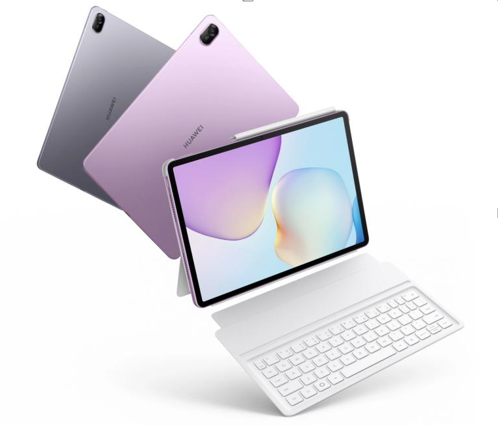
Accessories can transform a tablet into a full productivity hub. A detachable keyboard is invaluable for essay writing or extended note-taking, making typing more comfortable than on-screen keyboards. A sturdy protective case prevents everyday wear and tear, especially for students who move around frequently. Headphones are useful for online classes or studying in noisy environments. Even a simple stand can improve posture during long study sessions. While these items add to the initial cost, they significantly improve the learning experience and make the tablet more versatile.
Common Mistakes Students Make When Choosing Tablets
One common mistake is focusing only on price and ignoring long-term usability. A cheaper device may save money upfront but fail to meet performance needs later. Another error is overlooking the importance of software updates, which keep the tablet secure and compatible with new apps. Students also sometimes underestimate how much storage they’ll need, leading to frustration when files pile up. Choosing based solely on looks rather than function can also cause regret. Avoiding these pitfalls means carefully balancing budget, performance, and durability from the start.
Conclusion
The best tablet for students is the one that fits their specific study habits and lifestyle. Those who take lots of notes should prioritize stylus support, while frequent travelers may value lightweight design and strong battery life. Students on tighter budgets can still find devices with balanced features if they focus on essentials rather than extras. For example, the huawei matepad 11.5 new offers a comprehensive set of features, making it a strong all-rounder that can meet all the academic needs of students. With thoughtful selection, your tablet can become more than just a gadget—it can be a reliable partner in your education.